Strategy
Skip the CRM Busywork with Hubspot's MCP Server

Model Context Protocol (MCP) servers let you manage your CRM through natural language instead of endless clicking. You'll learn what MCP servers do, how to create deals and run reports without opening HubSpot, and what limitations to expect while the technology matures.
Adding a deal to HubSpot takes about 17 clicks and two and a half minutes. You navigate to the right pipeline, tab through edit fields, fat-finger something, delete it, try again. By the time you're done, you've lost momentum on whatever you were actually doing.
Now imagine speaking a 7 second update and having the deal created automatically. The pipeline is correct. The close date is set. The contact is associated. You never opened HubSpot.
That's what Model Context Protocol servers make possible. They put a conversational layer between you and your business systems so you can talk to tools like HubSpot in plain English instead of clicking through menus.
Behind the scenes
Think of MCP servers as translators. When you ask a question or give a command in plain English, the MCP layer converts that into the correct API calls for whatever system you're connecting to. The responses come back in readable form rather than raw data.
With a standard API integration, you need to know the exact endpoint, the correct formatting, the required fields. You're writing code or at minimum configuring something technical. With MCP, you describe what you want and the protocol handles the translation.
The Model Context Protocol documentation covers the technical architecture if you want to go deeper. The short version: MCP creates a standard way for AI applications to connect with external data sources and tools. Instead of each integration requiring custom code, platforms can publish MCP servers that any compatible AI interface can use.
HubSpot recently released a bi-directional MCP server. This means you can both read data from HubSpot and write data back to it. You can ask "show me all deals closing this month" and also say "create a new deal with these details."
Worth noting: write access through HubSpot's MCP server is currently in beta. Your company or partner admin needs to opt in before you can create or update records through the connection. Read access works immediately once you connect.
The headless CRM experience
The term "headless" comes from software architecture, where you separate the interface from the underlying functionality. A headless CRM means you get the data management and pipeline tracking without being forced into the CRM's interface.
For teams that spend their days in Claude, Slack, or Notion, this is welcome. Instead of context switching into HubSpot to update a deal, you update it from wherever you already are. The CRM becomes infrastructure rather than a destination.
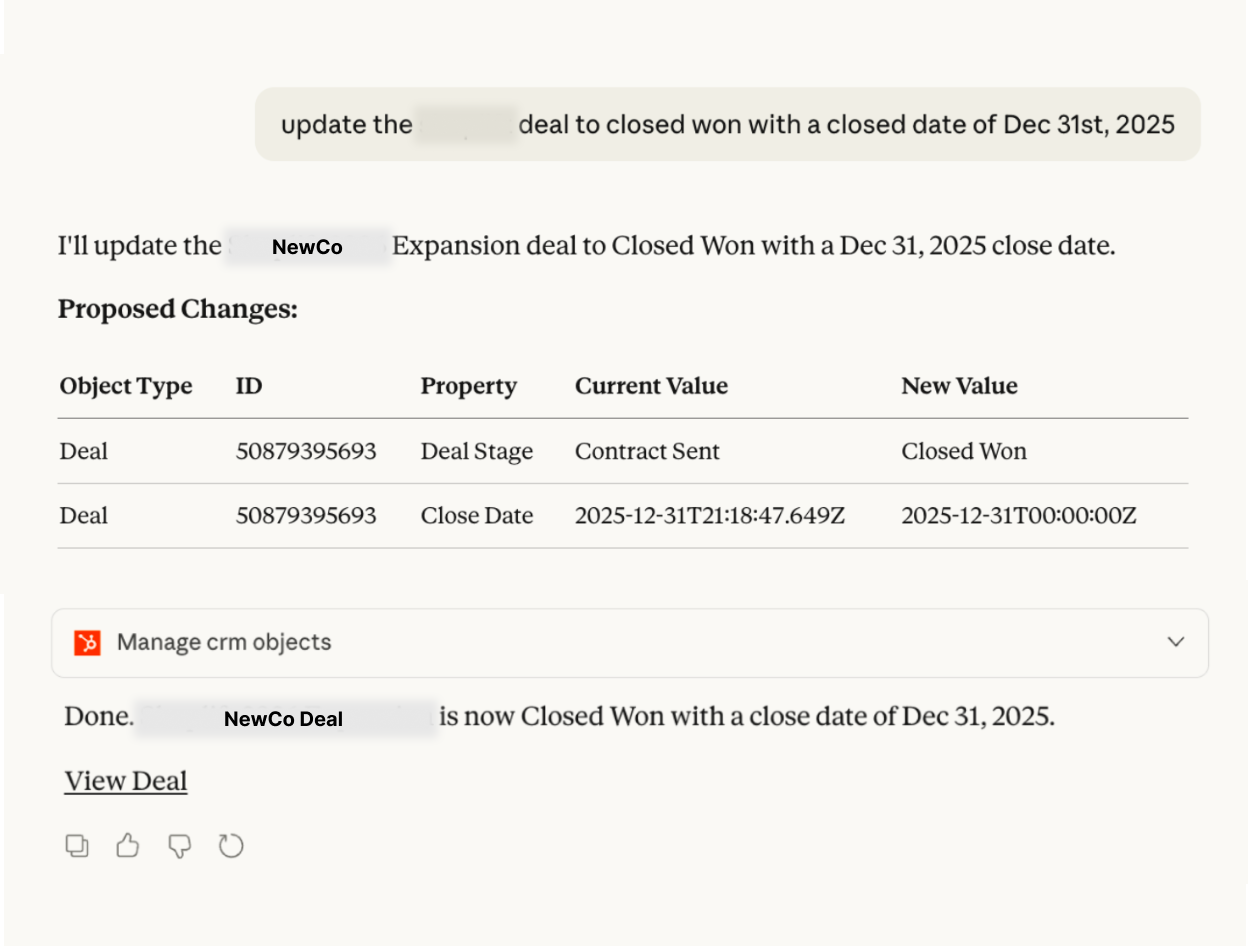
Here's an actual prompt that creates a complete deal record:
"Add a new deal to HubSpot called 'NewCo GTM Assessment', assign it to me, associate the deal with Robert Duncan, set this to first deal stage in our pipeline, close date Mar 31, and set the lead source to 'Client Referral', deal type new business"
That single request replaces opening HubSpot, navigating to the pipeline, clicking "Add Deal," filling in the deal name, setting the amount, selecting the pipeline stage from a dropdown, picking a close date from the calendar widget, searching for and associating the contact, setting the deal type, configuring the lead source property, and finally clicking save.
The MCP server processes the whole thing, creates the deal record, makes all the associations, sets every field, and confirms what it did. Seconds instead of minutes.
What this looks like in practice
Setting up the HubSpot MCP connection in Claude means enabling the connector in your settings. Once connected, you'll authorize specific tool functions the first time you use them. After that initial setup, the connection persists.
The real value shows up in recurring work. Updating deal stages, adding notes, changing amounts, associating new contacts. Each of these tasks involves multiple clicks and screen navigation in the traditional interface. Through MCP, they become single requests.
The time savings compound quickly. If you're managing a pipeline with 20 active deals and touching each one even once per week, you're looking at hours reclaimed monthly.
Notice in the example prompt that you can reference contacts by name ("Robert Duncan") rather than hunting for record IDs or email addresses. You can use relative terms like "first deal stage in our pipeline" instead of memorizing exact stage names. The MCP layer handles the translation to HubSpot's internal structure.
Ad-hoc reporting without the formatting fights
Anyone who has built reports inside HubSpot knows the frustration. You want a specific view of your data, but the report builder has opinions about how that data should look. Column limits. Visualization restrictions. Export formats that require cleanup before they're usable.
MCP changes this. Instead of conforming to what HubSpot's reporting interface allows, you describe what you want to see and get it back in whatever format makes sense.
"Show me all deals by stage with associated contacts and last activity date, sorted by days since last touch."
The response comes back as structured data you can use however you'd like. No clicking through configuration screens. No wrestling with chart types that don't fit your data.
The real gain here is iteration speed. In HubSpot's report builder, changing a filter or adding a column means navigating back through configuration screens. With MCP, you refine your query conversationally. "Actually, filter that to just deals over $50k" or "Add the deal owner column" becomes a quick follow-up rather than a multi-click detour.
The tradeoff is a lack of standardized reporting while you're in iteration mode. You want your data to build on itself over time, to tell a story with trends and patterns, not start from scratch every week. This is where the opportunity to rethink what you really want your data to tell you comes in.
We're finding a middle ground that works right now. We keep a base set of reports that run clockwork week over week. They drive accountability and data checks. Then all the exploration off of that data goes back to MCP prompts, augmenting the data story for that particular week.

Hubspot's MCP Limitations
MCP servers are still maturing. You'll encounter quirks. Sometimes the connection needs re-authorization. Sometimes the AI layer needs gentle reminders that it does have access to the tools you've configured.
The technology requires the right setup. You need Claude's desktop app or similar interface that supports MCP connections. You need the specific MCP server for the tool you're connecting to. Not every platform has released one yet.
Write operations require beta access through your HubSpot admin. If you're testing this personally, you may be limited to read operations until your organization enables the beta features.
One thing to expect: the MCP tool connections reset periodically and require re-authentication. Part of this is because these integrations are actively evolving. Just be prepared to reconnect from time to time as things stabilize.
There's also a learning curve in how you phrase requests. Being specific helps. The example prompt above works well because it includes everything in one request: deal name, amount, pipeline stage, close date, contact association, lead source, and deal type. The more complete your prompt, the more accurate the result.
What this means for GTM operations
Nobody loves their CRM. This is an industry-wide truth. The systems exist because pipeline visibility matters, because forecasting requires data, because revenue operations need structure. But the interfaces are friction-heavy by design. They prioritize data capture over user experience.
MCP servers let teams interact with CRM data from wherever they already work. If your revenue team lives in Slack and Claude and Gmail, they can now update HubSpot from those environments. The CRM still does its job. You just don't have to live inside it anymore.
That connects to something we keep seeing in go-to-market operations. The tools that win are the ones that reduce busywork, not just move clicks from one interface to another.
For teams evaluating their tech stack, MCP compatibility is worth paying attention to. The platforms investing in these connection protocols are the ones building for where workflow is actually heading.
Getting started
If you want to experiment with MCP servers and HubSpot, the workflow is similar whether you're using Claude or ChatGPT:
- Install Claude's desktop application (or use ChatGPT's interface)
- Navigate to settings and enable the HubSpot connector
- Authorize the connection to your HubSpot instance
- Start with simple read queries to test the connection
- Contact your HubSpot admin about enabling beta write access
- Move to write operations once beta access is confirmed
The initial setup takes about fifteen minutes. After that, you're working in a different mode. Less clicking, more doing.
Frequently Asked Questions
Q: Do I need to be technical to use MCP servers with HubSpot?
No. The entire point of MCP is removing the technical barrier. You interact through natural language prompts like "create a new deal called X and assign it to me." The protocol handles the translation to HubSpot's API structure. If you can describe what you want in a sentence, you can use MCP.
Q: What is a headless CRM?
A CRM you interact with through APIs or AI prompts instead of its native interface. You get the data management without living inside the software.
Q: Is MCP reliable for daily use?
It's maturing. Connections reset periodically and need re-authentication. Best for teams comfortable with occasional troubleshooting as the technology stabilizes.
Q: Can MCP create deals in HubSpot?
Yes, but write access is in beta. Your admin must enable it. Read access works immediately. Once enabled, you create deals with a single prompt.